OpenBSD CD pre-sales are an order of magnitude lower than expected. Since the OpenBSD project is funded completely by donations and sales of merchandise, this is a worry.
With the scheduled release of version 4.6 being right around the corner, now is the perfect time to order a CD set and help out the project that has given us not only the world's most secure operating system, but highly successful related projects like OpenSSH, OpenCVS and OpenNTPD among others. Regardless of your opinion on Theo personally, I'm sure you'll agree that the project deserves respect for its achievements and refusal to compromise.
I'll be ordering my CD set and maybe a nice T-shirt, too. And a poster. And, who knows, maybe a mug...
Recently, while playing a game of bridge at the Memorable Order of Tin Hats, I overheard an elderly woman comment that she thinks OpenBSD is becoming progressively redundant. That its comparatively slow speed will cause it to fall by the wayside as it becomes easier to properly secure systems like Linux or FreeBSD.
This argument superficially holds water, seeing as an OpenBSD install does run slightly slower than Linux, FreeBSD, or most other good OSes. But what it comes down to is that it depends on your needs.
If you need an OS that can squeeze every last ounce of performance out of your system, and you don't mind getting this optimization at the expense of (at least theoretical) security vulnerability, then there's no real reason to use OpenBSD. If security is priority, then the choice is obvious.
Even if it were possible to get a hardened Linux to match OpenBSD's level of security (and it isn't, due to the Linux kernel's dependence on binary blob drivers), I don't believe this would be possible without a significant performance hit unless, as I hinted, compromises were made elsewhere by, for example, not utilizing the ProPolice GCC extension, Systrace sandboxing of untrusted applications, or implementation of W^X, mmap, or the strlcpy() family of string functions.
On the other hand, OpenBSD is already secure by default. Let's face it, the weakest link in any system is its administrator, and the less security optimization work that is left up to him, the more robust the system would be in the long run.
There's no "best" operating system, only a best for your particular needs. If you need security, go OpenBSD. If you need performance, go FreeBSD. If you need to SSH to your toaster, go NetBSD. If you need application support, go Linux. If you embrace gay pride, go Mac OS X. And if you like the challenge of running a buggy, insecure, unstable, legal gauntlet of an OS, go Windows.
If you read this far without suffering an aneurysm, don't forget to visit the OpenBSD ordering page to buy some great swag if you so please.
Showing posts with label bsd. Show all posts
Showing posts with label bsd. Show all posts
Thursday, September 10, 2009
Saturday, September 05, 2009
Bash prompt fun
Like your sexual preference, your taste in wine, or your favourite Backstreet Boy, your shell prompt is a very personal thing and can say a lot about you.
Some old-school hackers prefer the minimal '$' you get by default with, for example, pdksh, and whine that any information displayed by the shell prompt is better gleaned from running a relevant command when needed. For example, instead of having the current working directory on your screen at all times, just type pwd when the need arises. This is perfectly fine if it suits your needs and circumstances, but these differ from user to user.
Unix users can generally be divided into two groups when it comes to their taste in shell prompts: the putter-inners and the taker-outers. The taker-outers go minimal; removing what they see as cruft from their shell prompt. They feel that maximum screen real estate should be given to the output of commands, and anything that diminishes this or distracts from the output - such as escape sequences and colours - should be removed. When taken to the extreme, this results in a user who needlessly types commands from time to time when he could have comfortably fit the relevant information into his shell prompt.
The putter-inners, however, are in danger of adding so much needless crap into their shell prompts that they're in danger of melting their CPU everytime they hit Enter. I am a putter-inner.
My shell of choice is Bash, and due to my personal requirements there are some elements I insist on having in my prompt. Before we get to that, though, an obligatory screenshot of my prompt in action:

Okay, it's not pretty but I like it and it gets the job done.
Firstly, I like having a colour prompt. Some people find it distracting, but to me the colour neatly separates the prompt itself from the output of a command. I use a multi-line prompt because, even on the rare occasion I'm not in X, I'm using framebuffer console so my terminal window is always large, thus there's no shortage of screen space. This allows me to have a lot of information in my shell prompt without constantly having to flick my eyes from right to left on the screen.
As for the contents of the prompt, I'm always on the network so I like having my user@host visible. I use history commands so I want the history number visible, too. The next number is the number of jobs the shell is currently running. Since I use Emacs and Ctrl-z a lot, this is quite important to me. Similarly, I am often using GNU Screen, so I have the current TTY echoed as well. The red exclamation mark only shows if the previous command exited with a non-zero status. Since I'm often debugging code, this is crucial. The last element on the next line is, obviously, the current working directory. I need this as I am always moving around in my directory tree.
Some common prompt elements I don't use are the time and/or date (if you need to be reminded of the time - or even worse, the date - each time you hit enter, your shell prompt is the least of your problems), and the familiar UID character ('$' or '#') as I am very much a sudo advocate.
The code in my .bashrc for the above prompt follows:
# Multi-line prompt to display: 1. user@host; 2. history number
# of the current command; 3. number of jobs; 4. tty;
# 5. exit status of previous command; 6. working directory
#
# "\033(0" drops term into line-drawing mode. "\033(B" takes it out.
function sweet_prompt {
local cur_tty=$(temp=$(tty) ; echo ${temp:5});
local LIGHT_RED="\[\033[1;31m\]"
local LIGHT_GREEN="\[\033[1;32m\]"
local LIGHT_BLUE="\[\033[1;34m\]"
local NO_COLOUR="\[\033[0m\]"
PS1="$LIGHT_GREEN\033(0\154\161\033(B$LIGHT_BLUE($LIGHT_GREEN\u$LIGHT_BLUE@$LIGHT_GREEN\h$LIGHT_BLUE)$LIGHT_GREEN-$LIGHT_BLUE($LIGHT_GREEN\!$LIGHT_BLUE-$LIGHT_GREEN\j$LIGHT_BLUE-$LIGHT_GREEN$cur_tty$LIGHT_BLUE)$LIGHT_GREEN\033(0\161\161\033(B\`if [ \$? = 0 ]; then echo \[\e[34m\]]\[\e[0m\]; else echo \[\e[31m\]!\[\e[0m\]; fi\`$LIGHT_BLUE\033(0\176$LIGHT_GREEN\161\176\176\033(B\n\033(0\155\033(B$LIGHT_BLUE($LIGHT_GREEN\W$LIGHT_BLUE($LIGHT_GREEN\033(0\161\176$LIGHT_BLUE\176\033(B$NO_COLOUR "
PS2="> "
}
Ugly, I know, but I don't have the inclination to de-spaghettify it.
I use rxvt-unicode as my terminal emulator with the Terminus font (the best monospaced font ever. Perfect for those who stare at the screen for 8+ hours a day). I can't guarantee that the above code works under different circumstances.
Some old-school hackers prefer the minimal '$' you get by default with, for example, pdksh, and whine that any information displayed by the shell prompt is better gleaned from running a relevant command when needed. For example, instead of having the current working directory on your screen at all times, just type pwd when the need arises. This is perfectly fine if it suits your needs and circumstances, but these differ from user to user.
Unix users can generally be divided into two groups when it comes to their taste in shell prompts: the putter-inners and the taker-outers. The taker-outers go minimal; removing what they see as cruft from their shell prompt. They feel that maximum screen real estate should be given to the output of commands, and anything that diminishes this or distracts from the output - such as escape sequences and colours - should be removed. When taken to the extreme, this results in a user who needlessly types commands from time to time when he could have comfortably fit the relevant information into his shell prompt.
The putter-inners, however, are in danger of adding so much needless crap into their shell prompts that they're in danger of melting their CPU everytime they hit Enter. I am a putter-inner.
My shell of choice is Bash, and due to my personal requirements there are some elements I insist on having in my prompt. Before we get to that, though, an obligatory screenshot of my prompt in action:
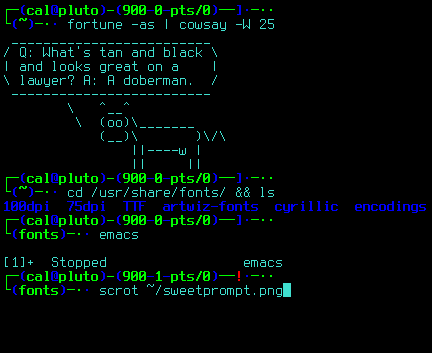
Okay, it's not pretty but I like it and it gets the job done.
Firstly, I like having a colour prompt. Some people find it distracting, but to me the colour neatly separates the prompt itself from the output of a command. I use a multi-line prompt because, even on the rare occasion I'm not in X, I'm using framebuffer console so my terminal window is always large, thus there's no shortage of screen space. This allows me to have a lot of information in my shell prompt without constantly having to flick my eyes from right to left on the screen.
As for the contents of the prompt, I'm always on the network so I like having my user@host visible. I use history commands so I want the history number visible, too. The next number is the number of jobs the shell is currently running. Since I use Emacs and Ctrl-z a lot, this is quite important to me. Similarly, I am often using GNU Screen, so I have the current TTY echoed as well. The red exclamation mark only shows if the previous command exited with a non-zero status. Since I'm often debugging code, this is crucial. The last element on the next line is, obviously, the current working directory. I need this as I am always moving around in my directory tree.
Some common prompt elements I don't use are the time and/or date (if you need to be reminded of the time - or even worse, the date - each time you hit enter, your shell prompt is the least of your problems), and the familiar UID character ('$' or '#') as I am very much a sudo advocate.
The code in my .bashrc for the above prompt follows:
# Multi-line prompt to display: 1. user@host; 2. history number
# of the current command; 3. number of jobs; 4. tty;
# 5. exit status of previous command; 6. working directory
#
# "\033(0" drops term into line-drawing mode. "\033(B" takes it out.
function sweet_prompt {
local cur_tty=$(temp=$(tty) ; echo ${temp:5});
local LIGHT_RED="\[\033[1;31m\]"
local LIGHT_GREEN="\[\033[1;32m\]"
local LIGHT_BLUE="\[\033[1;34m\]"
local NO_COLOUR="\[\033[0m\]"
PS1="$LIGHT_GREEN\033(0\154\161\033(B$LIGHT_BLUE($LIGHT_GREEN\u$LIGHT_BLUE@$LIGHT_GREEN\h$LIGHT_BLUE)$LIGHT_GREEN-$LIGHT_BLUE($LIGHT_GREEN\!$LIGHT_BLUE-$LIGHT_GREEN\j$LIGHT_BLUE-$LIGHT_GREEN$cur_tty$LIGHT_BLUE)$LIGHT_GREEN\033(0\161\161\033(B\`if [ \$? = 0 ]; then echo \[\e[34m\]]\[\e[0m\]; else echo \[\e[31m\]!\[\e[0m\]; fi\`$LIGHT_BLUE\033(0\176$LIGHT_GREEN\161\176\176\033(B\n\033(0\155\033(B$LIGHT_BLUE($LIGHT_GREEN\W$LIGHT_BLUE($LIGHT_GREEN\033(0\161\176$LIGHT_BLUE\176\033(B$NO_COLOUR "
PS2="> "
}
Ugly, I know, but I don't have the inclination to de-spaghettify it.
I use rxvt-unicode as my terminal emulator with the Terminus font (the best monospaced font ever. Perfect for those who stare at the screen for 8+ hours a day). I can't guarantee that the above code works under different circumstances.
Subscribe to:
Posts (Atom)